Translate Page to Indonesia OR
Arabic Korean Japanese Chinese Simplified Russian Portuguese English French German Spain Italian Dutch

Power ISO 4.3 - Final

Create, edit, extract, convert, compress, encrypt, mount CD image file!!!
PowerISO is a powerful image processing and file compression tool, which allows you to create, extract, compress, edit and convert ISO/BIN image files, and mount these files with internal virtual drive. And most of all, the compressed files can be used directly without decompressing.

Main Features:
- Support almost all CD/DVD-ROM image file formats (ISO, BIN, NRG, IMG, DAA and so on).
Note: DAA (Direct-Access-Archive) is an advanced format for image file, which supports some advanced features, such as compression, password protection, and splitting to multiple volumes. It can be handled directly just like other formats, such as ISO, BIN, …
- Supports on-the-fly burning.
- Supports UDF image file.
- Create image file from hard disk files or CD/DVD-ROM.
- Edit an existing image file.
- Can edit and burn Audio CD image file.
- Extract files and folders from image file.
- Convert image files between ISO/BIN and other formats.
- Make bootable image file, get boot information from bootable image file.
- Make floppy disk image file.
- Optimize files to save disk space while saving image files.
- Mount image file with internal virtual drive. Even if the image file is saved as DAA format, the virtual drive can handle that format directly.
- Support shell integration, such as context menu, Drag and Drop, clipboard…
- Supports command-line parameters.
- Can open XBOX image file.
- Supports multiple languages
- Supports Windows XP 64-bit Edition and Vista.

New Features:
* Supports Windows Vista.
* Supports on-the-fly burning.
* Supports Apple DMG file.
* Supports multiple languages.
* Supports command-line parameters.

Changes in PowerISO 4.3 (Nov 6, 2008):
+) Support up to 23 virtual drives.
+) Can open Blu-Ray iso files.
*) Some minor bug fixes and improvements.

Size: 1.09 MB


DOWNLOAD here


SMS Sender

With this software you can send your SMS to one or more destination. M.W. SMS Sender allows also to easily create and manage your contact lists and to send instant SMS messages to your lists.
With M.W. SMS Sender, it’s possible to do all what you can do with a mobile phone and with a best price. Send to a friend, to a group, send a lot of SMS messages, list creation and management, personalize the SMS sender name or number.. all these features in a very attractive, nice and simple user interface.
Either you are a particular or professional, M.W. SMS Sender is the ideal tool for your communication.


Download here
Password: theseekersoasis.org


kaspersky internet security 2011


Key Features and Benefits

Kaspersky Internet Security 2011 stops your PC or Netbook being slowed down by cybercriminals and delivers unsurpassed on-line safety whilst protecting your files, music and photos from hackers:
  • Real-time proactive protection against all Internet threats Improved!
    Prevents all types of known and unknown malware from infecting your computer.
  • New Safe Surf feature for unparalleled online security New! 
    With Safe Surf you’ll never be exposed to harmful or offensive websites. Regular database updates from Kaspersky Lab means that Safe Surf will automatically block undesirable websites as they appear. Just switch it on.
  • Protection for your digital identity at all times Improved! 
    Smart anti-phishing protection and Virtual Keyboard keep your digital identity absolutely secure when you are shopping, banking or social networking online.
  • Feature-rich and effective Parental Control Improved! 
    The product’s advanced Parental Control features can block, limit and log applications and web access, so your children stay safe online.
  • Application Control prevents dangerous software from harming your system Improved! 
    Each program is granted rights and access to system resources based on an automated risk-assessment using Kaspersky Lab’s in-the-cloud security database.
  • System Watcher technology New! 
    Cutting-edge System Watcher technology monitors and analyzes every system event to accurately detect any dangerous behavior. If a threat occurs, the user will be prompted to roll back any malicious program activity.
  • Unique Safe Run mode for apps & websites Improved! 
    Safe Run mode lets you run suspicious applications and websites in a specially isolated environment where they cannot damage your system.
  • Special tools to treat even the most complex infections Improved!
    The installation CD can also be used as a bootable rescue disk to help you to restore your system should you ever need to. If you’ve downloaded your Kaspersky Lab product you can create your own Rescue CD using the program.
  • Easy-Access Desktop gadget New! 
    Checking your PC’s protection status and quickly accessing your preferred security features and settings has never been easier!


Adobe Photoshop Lightroom 3.0

Adobe Photoshop Lightroom 3 software is essential for today's digital photography workflow. Now you can quickly import, process, manage, and showcase your images - from one shot to an entire shoot. With Lightroom 2, you spend less time in front of the computer and more time behind the lens.

New Adobe Photoshop Lightroom 3 software is the professional photographer's essential toolbox, providing one easy application for managing, adjusting, and presenting large volumes of digital photographs so you can spend less time in front of the computer and more time behind the lens. So you can spend less time sorting and refining photographs, and more time actually shooting them. Its clean, elegant interface literally steps out of the way and lets you quickly view and work with the images you shot today, as well as the thousands of images that you will shoot over the course of your career. Because no two photographers work alike, Adobe Lightroom adapts to your workflow, not the other way around.


Top new features:
- Superior noise reduction
Achieve amazing, natural-looking results from your high ISO images with all-new state-of-the-art noise reduction technology. You won't need more than what's built into Adobe? Photoshop? Lightroom? 3 to get the cleanest images at any ISO.

- Accelerated performance
Get your digital photography tasks done fast and have more time to shoot and promote your work. Already quick performance has been dramatically accelerated in Lightroom 3, saving you time from first look to final image.

- Support for DSLR video files
Take advantage of new support for video files from most digital SLR cameras, which allows you to easily manage and organize both still photographs and video files side by side.

- Image watermarking
Easily embed your identity or your brand and logo in your images with more options for customizing their look. The new watermarking tool lets you apply text or graphic watermarks to a photo with adjustable size, position, and opacity.

- Easy image importing
Save time with fast image importing. The newly designed import interface is easy to set up and navigate, with clear visual indications of where your photos will be located and how they'll be organized after you've imported them.

- Perspective correction
Get more natural-looking results by applying powerful, nondestructive perspective correction to your images. Reduce or eliminate the distortion that can occur, for example, when you take a photograph with the camera pointed upward, causing buildings to appear to be leaning backward in your image.

- More flexible print packages
Showcase your work in more creative formats using highly customizable print layouts, which you can save as reusable templates. With the new custom print layout creation tool, you just drag one image or several shots onto a page and resize or reposition them as you like.


Changes in Adobe Photoshop Lightroom 3.0 Build 677000:
- Superior noise reduction: Achieve amazing, natural-looking results from your high ISO images with all-new state-of-the-art noise reduction technology. You won't need more than what's built into Adobe Photoshop Lightroom 3 to get the cleanest images at any ISO.

- Lens correction: Quickly and easily perfect your images by automatically reducing lens defects like geometric distortion, chromatic aberration, and vignetting with single-click profiles. Even images from the best lenses will be improved.

- Accelerated performance: Get your digital photography tasks done fast and have more time to shoot and promote your work. Already quick performance has been dramatically accelerated in Lightroom 3, saving you time from first look to final image.

- Flickr integration: Use Lightroom almost seamlessly with Flickr, a Yahoo! service. Upload your images directly to Flickr from within the Lightroom 3 Library. When friends or clients post comments and ratings on your Flickr galleries, you can immediately see their feedback in the Lightroom 3 Library alongside your images

- Support for DSLR video files: Take advantage of new support for video files from most digital SLR cameras, which allows you to easily manage and organize both still photographs and video files side by side.

- Image watermarking: Easily embed your identity or your brand and logo in your images with more options for customizing their look. The new watermarking tool lets you apply text or graphic watermarks to a photo with adjustable size, position, and opacity.

- Easy-to-share slide show videos with music: Show your images to clients, friends, or family with more style and flair using elegant slide shows with music. Slide shows are a breeze to create, and you can share them easily by exporting them as videos, even in high definition.

- Tethered shooting: Instantly import and view images as you shoot them with tethered capture, available for select cameras. Use it to make an immediate, highly detailed check of your shot, the lighting, or the shooting setup. Or get instant feedback from clients or subjects.

- Easy image importing: Save time with fast image importing. The newly designed import interface is easy to set up and navigate, with clear visual indications of where your photos will be located and how they'll be organized after you've imported them.

- Perspective correction: Get more natural-looking results by applying powerful, nondestructive perspective correction to your images. Reduce or eliminate the distortion that can occur, for example, when you take a photograph with the camera pointed upward, causing buildings to appear to be leaning backward in your image.

- Film grain simulation: Use new sliders to easily control the amount, size, and roughness of grain that you can add to your images to simulate the look of film.

- More flexible print packages: Showcase your work in more creative formats using highly customizable print layouts, which you can save as reusable templates. With the new custom print layout creation tool, you just drag one image or several shots onto a page and resize or reposition them as you like.


Minimum system requirements for Lightroom 3:
- Intel Pentium 4 processor
- Microsoft? Windows? XP with Service Pack 2 or Windows Vista? Home Premium, Business, Ultimate, or Enterprise (certified for 32-bit and 64-bit editions)
- 1GB of RAM
- 1GB of available hard-disk space
- 1,024x768 display
- CD-ROM drive


Code:


http://www.fileserve.com/file/DF3cjbm/WarezXtreme.Org-Adobe_Photoshop_Lightroom_3.0_Full.rar
Code:
http://rapidshare.com/files/407301764/WarezXtreme.Org-Adobe_Photoshop_Lightroom_3.0_Full.rar


Error Repair Professional 4.0.2

"95% of All PCs Have Hidden Errors on Them! Let Us Scan Your PC and Discover How Many Errors Are Lurking Inside It..."
"Eliminate Them Instantly and Have The Peace Of Mind Knowing Your PC is Automatically Kept Error Free, 24 Hours A Day!"
Keep your PC operating smoothly by using Error Repair Professional to scan, identify, clean and repair errors in your PC with a single click. With a few easy steps, it will scan your entire registry for any invalid entries and provides a list of the registry errors found. You can then choose to selectively clean each item or automatically repair them all.Error Repair Professional ia registry cleaner that uses high-performance error identification algorithms to quickly identify missing and invalid references in your Windows registry. It will safely clean and repair Windows registry problems with a few simple clicks and enable you to enjoy a cleaner and more efficient PC. Error Repair Professional will guarantee that you eliminate errors in the nerve center of your PC.

Windows Registry is the nerve center of your PC and problems with the Windows Registry are a common cause of Windows crashes and error messages. These problems can occur for many reasons including uninstalling software with poor un-installation routines, by missing or corrupt hardware drivers, improperly deleting files and orphaned startup programs. By using Error Repair Professional regularly to fix error in Windows registry, your system should not only be more stable but it will also help Windows boot faster.

The Windows registry is a database which stores settings and options for the operating system for Microsoft Windows 32-bit versions, 64-bit versions. It contains information and settings for all the hardware, software, users, and preferences of the PC. Whenever a user makes changes to "Control Panel" settings, or file associations, system policies, or installed software, the changes are reflected and stored in the registry.


download:

Code:


http://rapidshare.com/files/407118578/RapidshareDonwloads.Org.Error.Repair.Pro.rar.html


System Mechanic Professional 9.5.8

System Mechanic Professional 9.5.8 | 66 MB

System Mechanic - is a program designed to support the performance of your computer at the highest level! System Mechanic can find unnecessary and duplicate files, clean the registry and find incorrect labels, remove broken links in the Add / Remove Programs, to track changes made during installation, manage the startup clean the hard drive of unnecessary files to defrag, and much more. Works great with Windows Vista.

Hardly anyone would deny that the safe operation of the computer depends on the degree of care. Do not think that we are talking about the need to regularly clean the monitor, system unit and keyboard dust. This is - by itself. Under the "care" in this case means the regular cleaning of the hard drive of unnecessary files and their duplicates (including cookies and browser cache), the guaranteed removal of information which should not be seeing strangers, nastroyaka parameters of

Windows (including optimized settings to connect to the Internet) , optimize the registry, and even desirable that all this took place in the automatic mode. Of course, unnecessary files (like *. bak) can find and remove them manually, but how much it take? A registry? How many dare to do it manually "reconstruction"? In addition, in some cases be traced as far recorded some installed program, then "manually" can not do.

Features:
- High-speed disk defragmentation and optimization
- Blocking of popup windows when you browse Web-pages on the Internet
- Defragment system memory
- Protection against spyware (Spyware) and unwanted programs
- Clean, optimize, defragment, compress and back up the registry
- Accelerating network and Internet connections up to 300%
- Manage programs that start automatically at boot
- Find and delete duplicate files and drivers
- Office of automatic assignments
- Access to hundreds of Windows settings
- Find, fix, or remove incorrect Windows shortcuts
- Find and delete incorrect entries in the list of installed programs
- Uninstalling the program or move on any disk in any folder with preservation of their efficiency
- Securely delete files and folders can not be recovered
- Safely remove internet tracks (cache, cookies, history) and to ensure privacy
- Very simple operation servicing PC
- Create a snapshot of the system for the analysis of subsequent changes

link 1 :


link 2:


Babylon Pro 8.0.7

Babylon 8 is the world?s leading dictionary and language translation software. Babylon offers you the most intuitive tool for all your translation needs. With Babylon you can quickly translate emails, web pages, documents, instant messages, and more. All you have to do is click on the word or text that you want to translate and a small window instantly appears with the desired results fromBabylon?s extensive database of language dictionaries, glossaries and conversion tools.

Babylon 8 features:
? Single Click activation
? Text translation ? in 17 languages
? Results from the world?s leading publishers
? Encyclopedias including Wikipedia content
? Translations in more than 75 languages
? Unit Conversions ? Convert currencies, measurements and time
? Writing Tools for English
? Spelling Alternatives


Advanced SystemCare Pro v3.6.1.0

Advanced SystemCare Pro v3.6.1.0 | 7.7 MB


Advanced SystemCare PRO Edition The World?s Top System Utility for Superior PC Health. Advanced SystemCare PRO (formerly Advanced WinodwsCare Professional) provides an always-on, automated, all-in-one PC Healthcare Service with anti-spyware, privacy protection, performance tune-ups, and system cleaning capabilities. This powerful and award-winning precision tool fixes stubborn errors, cleans out clutter, optimizes internet and download speeds, ensures personal security and maintains maximum computer performance automatically.

Features:
? Designed for the latest Windows system environment. Gives your PC better speed and reliability
? Powerful Hard Drive Defrag and Optimization
? Next-generation Registry Deep Clean and Optimization
? Automated Working in the Background
? Defends PC Security with Extra Protection
? Quick and Extensive Clean-up for Hard Drives
? Keeps Your PC Running at Peak Performance
? Fixes Multiple System Errors


Code:

http://uploading.com/files/77ddfc38/Advanced.SystemCare.3.6.1.0.Pro_sharewarezs.com.rar/

or
Code:

http://www.fileserve.com/file/PnUB89n


Tweak-7 1.0 Build 1021

Tweak-7 1.0 Build 1021 | 20,73 Mb

Tweak-7 ? all the Vitamins your Windows 7 needs! Comparing Tweak-7 with other tweaking tools is simply impossible since no competitive product covers such a huge functionality: from simple registry tweaking to complex and fast registry cleaning and registry defragmentation to comprehensive system cleanup.

Tweak-7 is the premier companion to Windows 7: it gives you access to whatever you might need to keep your Windows 7 running smoothly, error free, and under your full control. System restrictions, system cleanup, system tweaking are just a few keywords describing the feature richness of Tweak-7.
Optimizing Windows 7 was never easier: Tweak-7 includes everything you need: hundreds of registry tweaks, intelligent system and registry cleaners and an auto optimizer keep your Windows 7 clean and fast.

? The worlds first tweaking and optimization solution designed especially for Windows 7.
? The latest innvovation in convenient and safe system customization, optimization and tweaking.

Quickfacts:
? Heaps of features to customize, optimize and tweak Windows 7
No need to dig into the system registry: activate hundreds of tweaks by a mouse click only
? Customize, optimize, cleanup and repair your Windows 7
Make Windows 7 work and look the way you want it to ? Tweak-7 includes everything you need for that
? Designed especially for Windows 7 ? unlike competetive products!
Be sure that everything included works on Windows 7 and does not harm it
? Performance tweaks and optimizations included
Speed up your CPU, your internet connection and much more

Some features:
? Activate hundreds of hidden Windows 7 settings to get the most out of your Windows 7
? Clean your registry with the integrated Registry Cleaner and Registry Defragmentation
? Activate system and software restrictions ? you decide what should be accessible or not
? Display detailed 3D system information
? Create a 256 MB RAM drive for fastest access (32bit systems only!)
? Customize whatever is customizable on Windows 7
? Clean your hard drive and remove unneccessary files to get wasted hard drive space back ? save hundreds of GB.
? Optimize memory management and memory usage
? Improve your internet connection by a few mouse clicks
? Optimize your CPU with special CPU tweaks
? Tweak your network with network speed-up settings
? Manage system updates, remove update backups, remove old system restore points
? Transfer your tweaks and settings to other machines running Windows 7 and Tweak-7

Changes in v1.0 Build 1021 ? November 21th 2009:
- Fixing a serious issue related to an invalid digital signature
* Some minor changes to the main application
* A few speed and performance improvements

link 1:


link 2:


registry cleaner

Fix Windows Slowdowns, Errors and Crashes

Works with Windows® 7, Vista®, and XP!

Don't compromise your Windows registry with the second best!

  • World's most popular registry cleaner with over 60 million downloads.
  • Recommended by experts and editors as the world's best registry cleaner.
  • Clean the registry to fix Windows errors and crashes.
  • Registry defrag to optimize your PC for better performance.
  • FREE support for all customers.
  • Easy to use. Designed for both expert and novice users.
  • 100% Money Back Guarantee


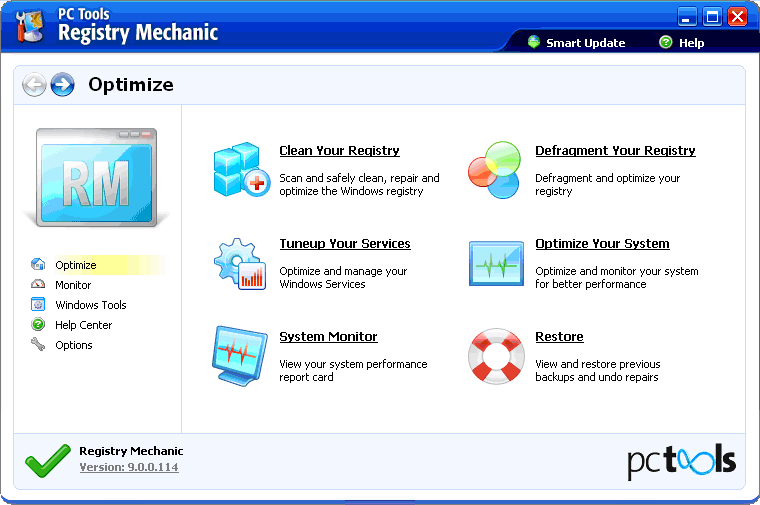
With Registry Mechanic you can safely clean, repair and optimize the Windows® registry with a few simple mouse clicks! Problems with the Windows® registry are a common cause of Windows® crashes, slow performance and error messages. By using a registry cleaner regularly and fixing registry errors your system should not only be more stable but it will also help improve your system performance without expensive hardware upgrades. Learn more about the importance of a clean registry with our registry insight

Registry Mechanic uses a high-performance detection algorithm to quickly identify missing and invalid references in your Windows® registry. These problems can occur for many reasons including being left-behind after the un-installation or incorrect removal of software, by missing or corrupt hardware drivers, or orphaned startup programs.
With a few easy steps our Windows registry cleaner will scan your entire registry for any invalid entries in the Windows registry and provide a list of the registry errors found, you can then choose to selectively clean each item or automatically repair them all. For your convenience and protection Registry Mechanic can also make a backup of any repairs made so that you can easily recover any changes if required.

Registry Mechanic Windows Registry Cleaner Information

Current Version:9.0.0.128
File Size:9,999 KB
Operating System:Microsoft Windows 7 (32bit, 64bit), Windows Vista SP1+ (32bit, 64bit), Windows XP SP2+ (32bit)
Release Date:October 15, 2009
Designed to:Clean, defrag and compact your registry to optimize your PC for better performance.
Trial Limitations:The trial is time unlimited and removes problems found in 6 sections of the registry only. A registered version is required to remove all detected problems.